B21, China Town Mall, Midrand

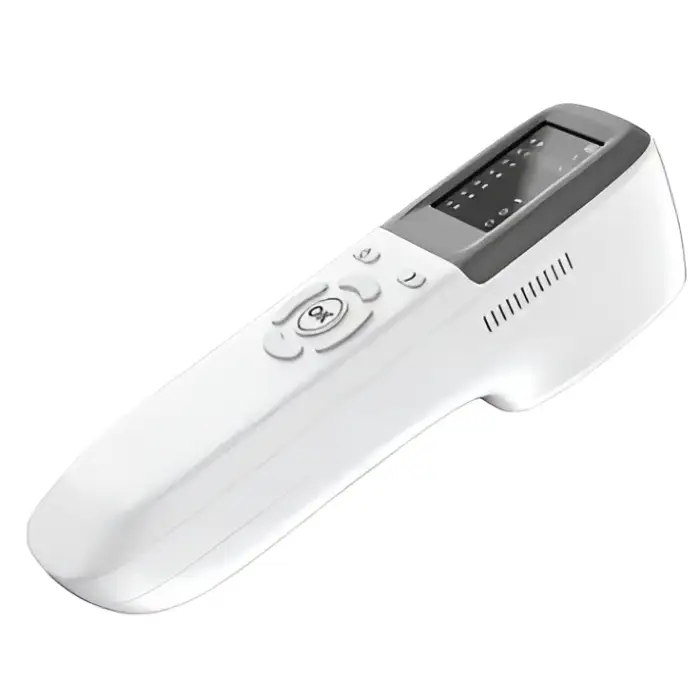
QV-600 Injection Vein Finder Machine

- Section : Medical Supplies
- Category : Clinical Analytical Instruments
- SKU : 1600930825490

QV-500 Portable Vein Finder
The QV-500 Portable Vein Finder by HouYuan Medical is an advanced device designed to aid healthcare professionals in locating veins for intravenous injections or blood collection. This portable, easy-to-use tool enhances accuracy and efficiency in clinical settings.
Key Features
- Precise Vein Detection: Uses infrared technology to detect venous vessels with depth detection ranging from 0 to 10mm, providing accurate readings for effective vein location.
- Optimal Detection Distance: Best detection range of 15-25cm, making it suitable for various clinical environments.
- Portable and Lightweight: Weighing only 450g and with compact dimensions (2466.5cm), it is easy to carry and use for on-the-go vein detection.
- Large LCD Screen: Features a 2.4-inch LCD screen for clear visualization of vein mapping and detection results.
- Long Battery Life: Powered by a 4800mAh lithium battery, ensuring long usage times before recharging is needed.
- Color Options: Available in 12 colors to suit individual preferences and clinical settings.
- Versatile Application: Ideal for hospitals, medical centers, clinics, and other healthcare settings, assisting with venous vessel detection during procedures.
- Class II Medical Device: Complies with regulatory standards for medical devices, ensuring safety and performance in clinical use.
The QV-500 Portable Vein Finder offers a reliable, portable solution for accurate vein detection, improving the efficiency and success rate of medical procedures in various healthcare environments.
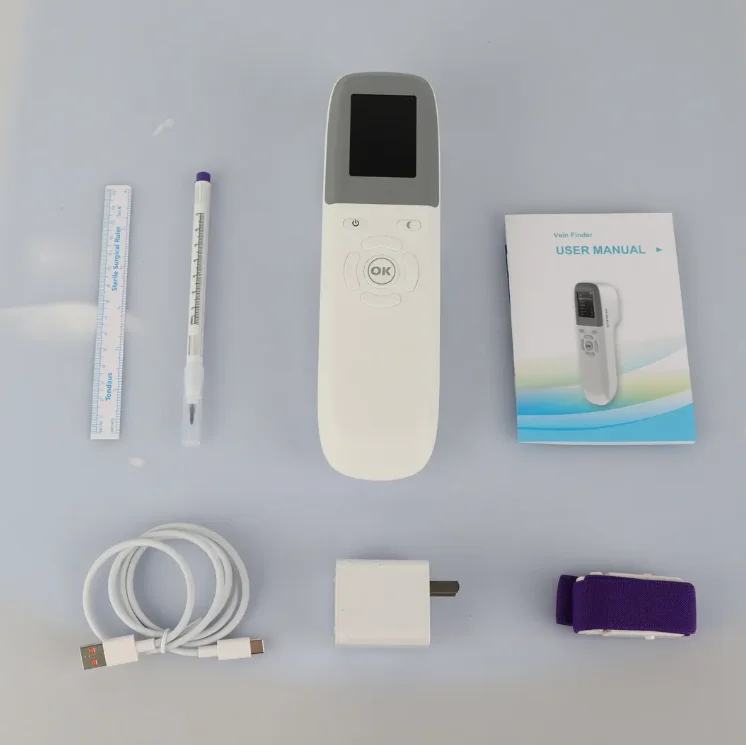
Product Info Gallery
Main Features
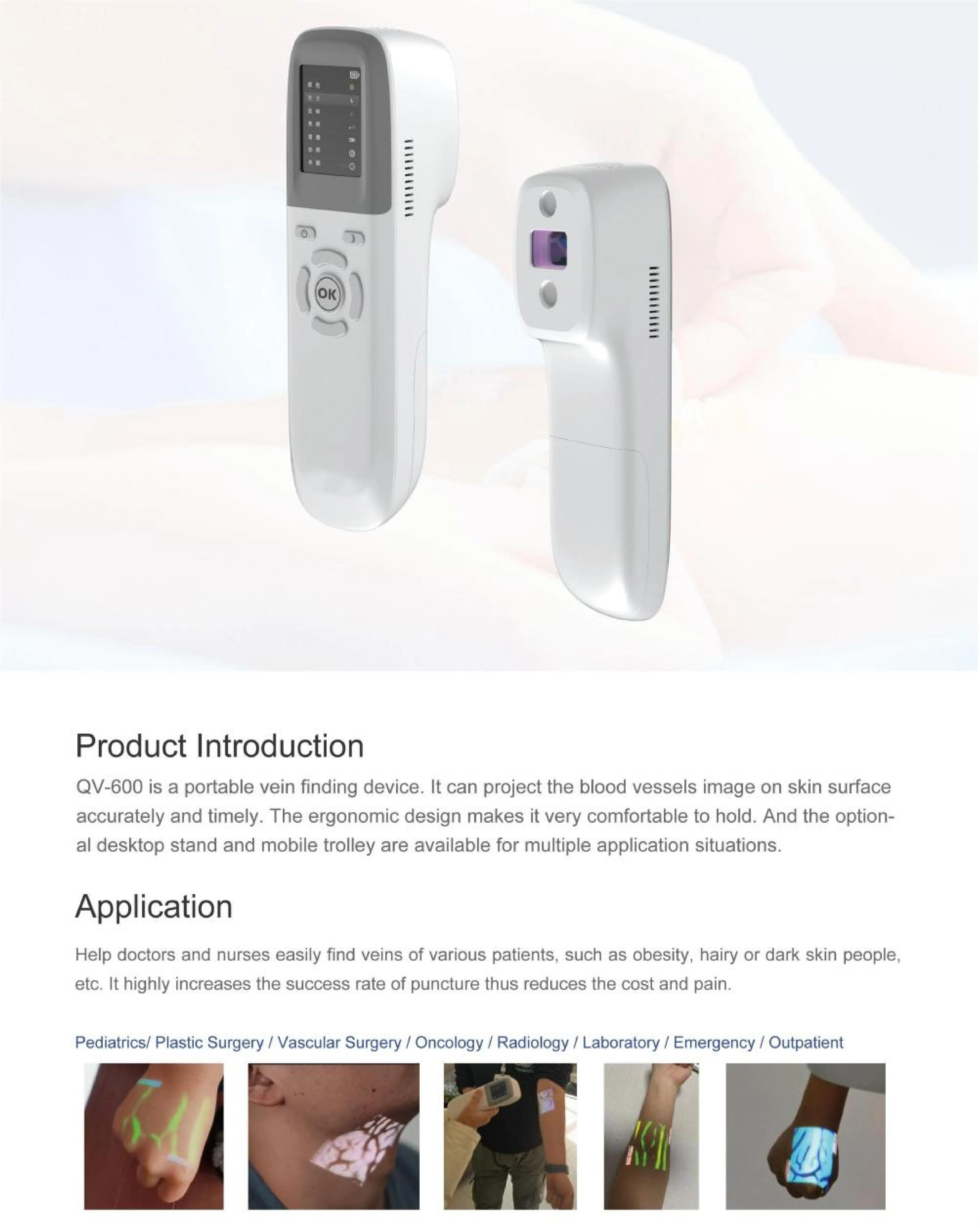
QV-600 is a portable vein finding device. lt can project the blood vessels image on skin surfaceaccurately and timely. The ergonomic design makes it very comfortable to hold. And the option-al desktop stand and mobile trolley are available for multiple application situations.
Application Help doctors and nurses easily find veins of various patients, such as obesity, hairy or dark skin people,etc. It highly increases the success rate of puncture thus reduces the cost and pain.

| 1 | 12 Colors Available: Suitable for different skin colors or environments. |
| 2 | 3 Sizes Available: Suitable for adults, children and newborns |
| 3 | 6 Levels of Brightness: Adjust the projection image to the most comfortable brightness. |
| 4 | Inversion: Reduce arm hair interference and make blood vessels clearer. |
| 5 | Enhancement Mode: Enhance the clarity of blood vessel detection. |
| 6 | Sleep Mode: enter into low power mode when the user needs short intervals and can be waked up quickly. |
| 7 | Power monitoring: The remaining battery is displayed on the screen, alert the user when the battery is low |
| 8 | Lauguage: 10 languages can be switched |
| 9 | Photograph: Store venous images for medical staff to track and analyze pathology. |
| 10 | Automatical shutdown without operation for 35 minutes |

- Shipping Timeframes: All orders are processed within 2-5 business days (excluding weekends and holidays). After your order has been processed, the estimated delivery time is before 24 Jun, 2026, depending on customs, Please note that due to high demand, some items may experience longer shipping times, which will be communicated at order confirmation email.
- Order Processing Time: Please allow 2-5 business days for us to process your order before it is shipped . Orders placed after 16:00 on Fridays, or during weekends and public holidays, will begin processing on the next business day. Processing times may be extended during peak seasons or sales events.
- Manufacturing Time: Some products needs manufacturing time, the manufacturing process will take approximately 10-30 business days depending on the product. This timeframe may vary depending on the complexity of the product and current demand. but this will be communicated with you during order confirmation.
- Returns and Exchanges: We offer a 30-day return policy for most items. If you are not completely satisfied with your purchase, you may return it within 30 days of receipt for a refund or exchange. Items must be unused, in their original packaging, and accompanied by proof of purchase. Return shipping costs are the responsibility of the customer, unless the item was damaged or defective upon arrival.
1. What is the QV-600 Injection Vein Finder Machine?
The QV-600 is a portable vein finding device that projects images of blood vessels onto the skin's surface, assisting healthcare professionals in locating veins accurately and efficiently for intravenous injections or blood collection.
2. How does the QV-600 help in finding veins?
The QV-600 uses advanced technology to detect venous vessels and project their images on the skin, which is particularly useful for patients with challenging vein visibility, such as those with obesity or dark skin.
3. What features make the QV-600 user-friendly?
The QV-600 is lightweight and ergonomic, making it comfortable to hold. It also has various brightness levels, adjustable projection, and a large LCD screen for easy visualization.
4. What are the color options available for the QV-600?
The QV-600 is available in 112 colors, allowing healthcare providers to choose a color that suits different skin tones and clinical environments.
5. How many sizes does the QV-600 accommodate?
The QV-600 is designed to cater to a wide range of patients, with 23 sizes available to fit adults, children, and newborns.
6. What is the battery life of the QV-600?
The QV-600 is powered by a lithium battery that provides long usage times before needing to be recharged, and it includes a battery monitoring feature to alert users when the charge is low.
7. Can the QV-600 be used in different healthcare settings?
Yes, the QV-600 is versatile and can be used in various healthcare settings such as hospitals, clinics, and medical centers, enhancing the efficiency of venous vessel detection during procedures.
8. Is the QV-600 compliant with medical device regulations?
Yes, the QV-600 complies with regulatory standards for medical devices, ensuring both safety and performance in clinical use.
9. What is the enhancement mode feature?
The enhancement mode improves the clarity of blood vessel detection, making it easier for medical staff to locate veins accurately.
10. Does the QV-600 have a sleep mode?
Yes, the QV-600 features a sleep mode that enters low power mode after 35 minutes of inactivity, allowing for quick wake-up when needed.
11. Can images of veins be stored using the QV-600?
Yes, the QV-600 allows for the storage of venous images, which can be useful for medical staff to track and analyze pathology over time.
12. How bright is the projection of the QV-600?
The QV-600 offers 36 levels of brightness, allowing users to adjust the projection image to the most comfortable level for their environment.
13. Are there any accessories available for the QV-600?
Yes, the QV-600 has optional accessories, including a desktop stand and mobile trolley, to enhance its usability in various application situations.
14. In how many languages can the QV-600 operate?
The QV-600 can switch between 10 different languages, making it accessible for a diverse range of users.
15. What should I do if the QV-600 is not functioning properly?
If the QV-600 is not functioning properly, check the battery level, ensure it is properly charged, and consult the user manual for troubleshooting tips or contact customer support for assistance.
Latest Order Arrivals
Discover our latest orders

12 Heads Embroidery Machine

Toilet Paper Machine Machine

Order Collection

Cross Border Clients

Order cros border countries Collected

Industrial Machine Cllection

Agriculture Processing Machines

Ready for collection

Water Pump Equipment

Packaging Machine and accessories

Fabrics Manufacturing Equipment

Mining Equipments

Food Processing Machine

Batch of Orders

Batch of Orders

Latest Orders Labelled

wheel alignment machines

new arrivals

Pre Orders Offloading

Latest Arrivals

Latest Arrivals

Latest Arrivals

Loading

Toilet paper making machine

Toilet paper making machine

Toilet paper Rewinding Machine

latest arrivals

offloading

order success

order collection

order offloading