B21, China Town Mall, Midrand

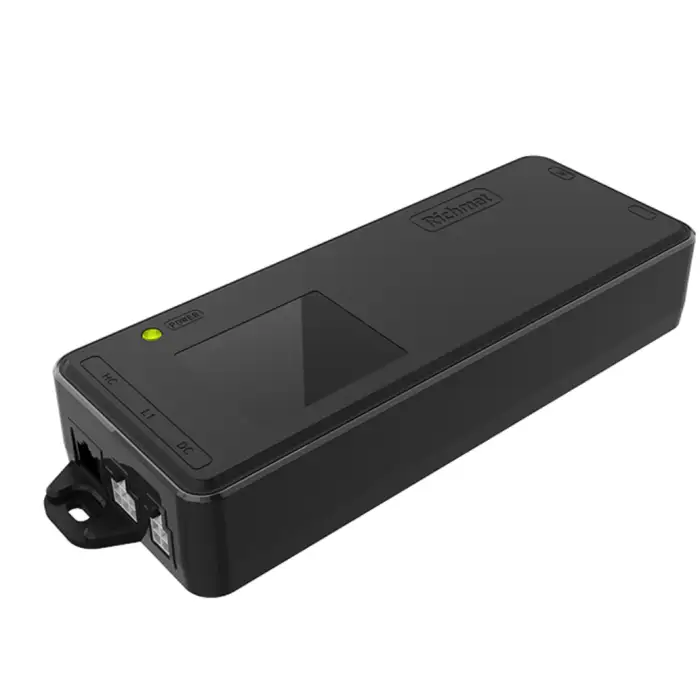
Connect One Lifting Column Electric Height Adjustable Desk Control Box

- Section : Furniture
- Category : Commercial Furniture
- SKU : 1600481432850

Connect One Lifting Column Electric Height Adjustable Desk Control Box
The Connect One Lifting Column Electric Height Adjustable Desk Control Box is a modern solution for your workspace needs. It allows you to easily adjust the height of your desk, making it perfect for various environments. Whether you are working from home, in an office, or at a hotel, this control box ensures your desk meets your comfort needs.
Specifications
| Attribute | Details |
|---|---|
| Material | ABS Plastic |
| Input Voltage | AC 100-240V |
| Rated Power | 100W |
| Color | Black |
| Column Connect NO. | 1 |
| Overheat / Overload Protection | Installed |
| Available Lithium Battery | Optional |
Key Features
- Modern design fits any decor.
- Height adjustable for comfort and convenience.
- Extendable to suit different desk sizes.
- Durable ABS plastic material.
- Overheat and overload protection for safety.
Applications
- Home Office
- Bedroom
- Outdoor workspaces
- Hotels
- Apartments
- Hospitals
The Connect One Lifting Column Electric Height Adjustable Desk Control Box is the perfect addition to any workspace, providing flexibility and comfort for users of all types. Upgrade your desk today!
Product Info Gallery
- Shipping Timeframes: All orders are processed within 2-5 business days (excluding weekends and holidays). After your order has been processed, the estimated delivery time is before 25 Dec, 2025, depending on customs, Please note that due to high demand, some items may experience longer shipping times, which will be communicated at order confirmation email.
- Order Processing Time: Please allow 2-5 business days for us to process your order before it is shipped . Orders placed after 16:00 on Fridays, or during weekends and public holidays, will begin processing on the next business day. Processing times may be extended during peak seasons or sales events.
- Manufacturing Time: Some products needs manufacturing time, the manufacturing process will take approximately 10-30 business days depending on the product. This timeframe may vary depending on the complexity of the product and current demand. but this will be communicated with you during order confirmation.
- Returns and Exchanges: We offer a 30-day return policy for most items. If you are not completely satisfied with your purchase, you may return it within 30 days of receipt for a refund or exchange. Items must be unused, in their original packaging, and accompanied by proof of purchase. Return shipping costs are the responsibility of the customer, unless the item was damaged or defective upon arrival.
1. What is the Connect One Lifting Column Electric Height Adjustable Desk Control Box?
It is an electronic control box that powers and controls a single electric lifting column to raise and lower a height-adjustable desk, providing smooth height adjustment for home, office, hotel, and other environments.
2. What are the main specifications of the control box?
Key specs: material ABS plastic, input voltage AC 100–240 V, rated power 100 W, color black, supports 1 lifting column connection, built-in overheat/overload protection, and an optional lithium battery.
3. How does the control box work?
The control box connects between the mains power and the lifting column motor. It supplies the motor with the correct power and safety protection, enabling up/down height adjustment via a desk controller or switch connected to the box.
4. How many lifting columns can this control box support?
This model supports one lifting column (Column Connect NO. 1). For multi-column setups you will need a control system designed for multiple columns.
5. Is a lithium battery included?
A lithium battery is optional. Some configurations offer an external or built-in battery for short-term operation during power outages, but you should confirm inclusion and specifications with the supplier.
6. What does the overheat/overload protection do?
Overheat/overload protection detects excessive temperature or current draw and will shut down the output to protect the motor and electronics. After the unit cools or the overload is removed, it typically resets — follow the product manual for recommended reset procedures.
7. What environments and applications is this control box suitable for?
Typical applications include home offices, bedrooms, outdoor workspaces (protected environments), hotels, apartments, and hospitals. Ensure installation meets local safety and environmental requirements.
8. What does the 100 W rated power mean for my desk motor?
Rated power (100 W) is the maximum continuous power the control box is designed to supply. Your lifting column motor should have power/current requirements within this limit. Motors that require substantially more power may overload the control box.
9. How can I tell if this control box is compatible with my lifting column or desk?
Check your lifting column motor’s voltage and power/current requirements and confirm they fall within AC 100–240 V input and the control box's 100 W rating. Also verify connector types and control signal compatibility. Contact the supplier with your motor model for confirmation if unsure.
10. What are the basic installation steps?
Typical steps: mount the control box under the desk in a ventilated spot, connect the lifting column motor cable to the box, connect the desk controller/switch, and plug the control box into a properly grounded AC outlet. Follow the supplied installation manual and consider a qualified electrician for mains connections.
11. My desk doesn't move when I press the control — what should I check?
Check that the control box is powered (AC mains connected), verify all cables and connectors are securely attached, ensure overload/overheat protection hasn’t tripped, and confirm any optional battery is charged/connected. If problems persist, consult the manual or contact technical support.
12. How should I maintain and clean the control box?
Keep the unit dry and dust-free. Wipe the exterior with a soft, dry cloth; avoid solvents, abrasives, or liquid cleaners. Ensure ventilation openings are not blocked and periodically inspect cables and connectors for wear.
13. What safety precautions should I follow?
Ensure proper grounding of the AC supply, do not expose the unit to water or extreme humidity, do not exceed the rated power or load capacity, disconnect mains power before servicing, and follow all instructions in the product manual. Keep children and untrained persons away from electrical connections.
14. Can this control box accommodate different desk sizes or extension ranges?
The control box itself controls the lifting column; 'extendable to suit different desk sizes' refers to using lifting columns with different stroke lengths or leg configurations. Ensure the chosen column(s) and mounting hardware match your desk size and weight requirements and are compatible with the control box.
15. Where can I get support, spare parts, or warranty information?
Contact the retailer or manufacturer where you purchased the unit for support, spare parts availability, and warranty details. Product listings or the user manual should list warranty terms, certifications, and authorized service channels.
Latest Order Arrivals
Discover our latest orders

12 Heads Embroidery Machine

Dewatering Pump Machine

Order Collection

Portable Water Drilling Rig

Order Usefully Collected

Batch of Orders

Agriculture Processing Machines

Meat Grinder Machine

Water Pump Equipment

Packaging Machine and accessories

Fabrics Manufacturing Equipment

Mining Equipments

Food Processing Machine

Batch of Orders

Batch of Orders

Latest Orders Labelled

wheel alignment machines

new arrivals

Pre Orders Offloading

Latest Arrivals

Latest Arrivals