B21, China Town Mall, Midrand

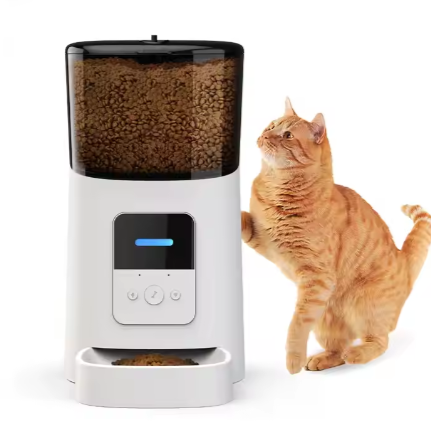
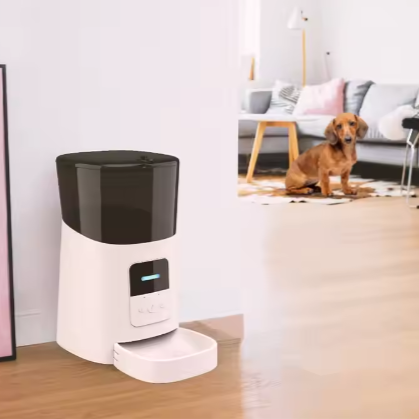
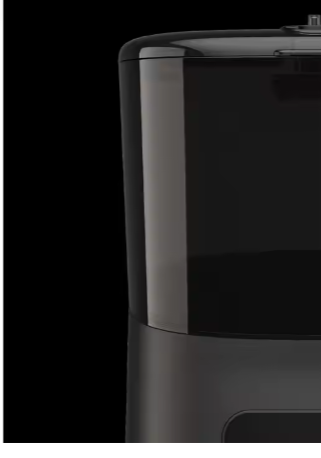
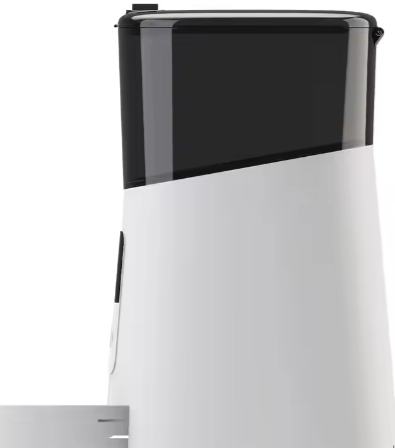
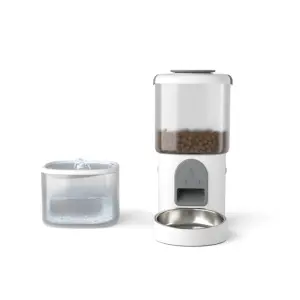
Automatic Smart Video Pet Feeder For Dog Cat Rounded Bowls With Camera

- Section : Pet Supplies
- Category : Pet Bowls & Feeders
- SKU : 1600691787451

Product Description

- Shipping Timeframes: All orders are processed within 2-5 business days (excluding weekends and holidays). After your order has been processed, the estimated delivery time is before 25 Dec, 2025, depending on customs, Please note that due to high demand, some items may experience longer shipping times, which will be communicated at order confirmation email.
- Order Processing Time: Please allow 2-5 business days for us to process your order before it is shipped . Orders placed after 16:00 on Fridays, or during weekends and public holidays, will begin processing on the next business day. Processing times may be extended during peak seasons or sales events.
- Manufacturing Time: Some products needs manufacturing time, the manufacturing process will take approximately 10-30 business days depending on the product. This timeframe may vary depending on the complexity of the product and current demand. but this will be communicated with you during order confirmation.
- Returns and Exchanges: We offer a 30-day return policy for most items. If you are not completely satisfied with your purchase, you may return it within 30 days of receipt for a refund or exchange. Items must be unused, in their original packaging, and accompanied by proof of purchase. Return shipping costs are the responsibility of the customer, unless the item was damaged or defective upon arrival.
1. What is the capacity of the food bowls in the Automatic Smart Video Pet Feeder?
The Automatic Smart Video Pet Feeder comes with rounded bowls that can hold up to 4 liters of dry pet food, making it suitable for both dogs and cats.
2. How does the camera feature work?
The built-in camera allows you to monitor your pets in real-time through a smartphone app. You can see and interact with your pets while you are away.
3. Can I schedule feeding times?
Yes, you can easily schedule feeding times and portion sizes using the companion app, ensuring your pet gets fed on time even when you're not home.
4. Is the feeder compatible with both dogs and cats?
Absolutely! The Automatic Smart Video Pet Feeder is designed to work for both dogs and cats, accommodating various feeding needs.
5. What type of food can I use with this feeder?
The feeder is designed for dry kibble pet food. Please ensure the kibble size is appropriate for the feeder to work effectively.
6. How do I set up the feeder?
Setting up the feeder is simple. Just plug it in, connect it to your Wi-Fi network via the app, and follow the on-screen instructions to configure the feeding schedule.
7. Does the feeder have a backup power option?
Yes, the feeder is equipped with a backup battery option to ensure it continues to function during power outages.
8. Can I interact with my pet through the feeder?
Yes, the feeder allows two-way audio communication, so you can talk to your pet and hear them as well through the app.
9. How do I clean the feeder?
The removable food bowl is dishwasher safe, and you can easily wipe the main unit with a damp cloth. Make sure to unplug it before cleaning.
10. Is there a warranty for the product?
Yes, the Automatic Smart Video Pet Feeder comes with a one-year warranty that covers any manufacturing defects.
11. Can I use it if I have multiple pets?
Yes, the feeder can be used for multiple pets, but you may need to monitor portions to ensure each pet receives their appropriate amount of food.
12. What happens if the feeder runs out of food?
The app will send you a notification when the food level is low, so you can refill it in time.
13. Is there a mobile app available for the feeder?
Yes, the feeder is compatible with a mobile app available for both iOS and Android devices, allowing you to control and monitor it easily.
14. What if my Wi-Fi connection is unstable?
The feeder will store feeding schedules even if the Wi-Fi connection drops, ensuring your pets are fed according to the set schedule.
15. How do I reset the feeder if needed?
To reset the feeder, simply press and hold the reset button located on the back of the unit for about 10 seconds until the indicator light flashes.
Latest Order Arrivals
Discover our latest orders

12 Heads Embroidery Machine

Dewatering Pump Machine

Order Collection

Portable Water Drilling Rig

Order Usefully Collected

Batch of Orders

Agriculture Processing Machines

Meat Grinder Machine

Water Pump Equipment

Packaging Machine and accessories

Fabrics Manufacturing Equipment

Mining Equipments

Food Processing Machine

Batch of Orders

Batch of Orders

Latest Orders Labelled

wheel alignment machines

new arrivals

Pre Orders Offloading

Latest Arrivals

Latest Arrivals