B21, China Town Mall, Midrand



- Shipping Timeframes: All orders are processed within 2-5 business days (excluding weekends and holidays). After your order has been processed, the estimated delivery time is before 11 Feb, 2026, depending on customs, Please note that due to high demand, some items may experience longer shipping times, which will be communicated at order confirmation email.
- Order Processing Time: Please allow 2-5 business days for us to process your order before it is shipped . Orders placed after 16:00 on Fridays, or during weekends and public holidays, will begin processing on the next business day. Processing times may be extended during peak seasons or sales events.
- Manufacturing Time: Some products needs manufacturing time, the manufacturing process will take approximately 10-30 business days depending on the product. This timeframe may vary depending on the complexity of the product and current demand. but this will be communicated with you during order confirmation.
- Returns and Exchanges: We offer a 30-day return policy for most items. If you are not completely satisfied with your purchase, you may return it within 30 days of receipt for a refund or exchange. Items must be unused, in their original packaging, and accompanied by proof of purchase. Return shipping costs are the responsibility of the customer, unless the item was damaged or defective upon arrival.
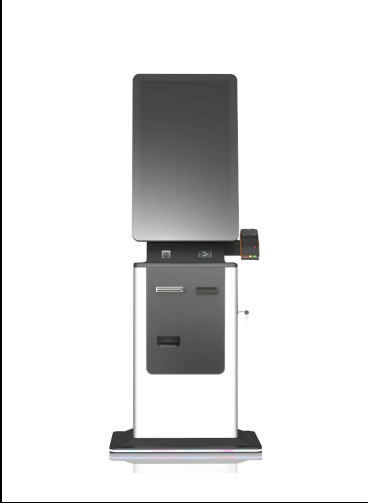
1. What is a Self Service Kiosk Printing Payment Ticket Printer?
A Self Service Kiosk Printing Payment Ticket Printer is a device designed to print tickets or receipts at self-service kiosks, allowing users to process payments and print necessary documentation without the need for staff assistance.
2. How does the Self Service Kiosk Printing Payment Ticket Printer work?
The printer connects to a self-service kiosk system, which typically includes a touch screen for user interaction. Once a payment is processed, the printer generates a ticket or receipt as confirmation.
3. What types of payments can be processed with this printer?
The printer can work with various payment methods, including credit/debit cards, mobile payments, and cash, depending on the kiosk's configuration.
4. Is the printer compatible with all kiosk systems?
The printer is designed to be compatible with most self-service kiosk systems, but it's important to check the specific compatibility requirements of your kiosk model.
5. What are the dimensions of the printer?
The dimensions of the printer can vary by model, so please refer to the product specifications for the exact measurements.
6. What type of paper does the printer use?
The printer typically uses thermal paper, which is designed for high-speed printing and requires no ink cartridges.
7. How fast can the printer print tickets?
Printing speed can vary, but most self-service kiosk printers can print tickets in just a few seconds.
8. Can the printer be used for multiple languages?
Yes, many self-service kiosk printers support multiple languages, allowing for customization based on user preferences.
9. Is maintenance required for the printer?
Regular maintenance is recommended to ensure optimal performance, including cleaning the print head and replacing thermal paper as needed.
10. What are the common applications for this printer?
Common applications include ticketing for transportation, events, parking, and various retail transactions.
11. Does the printer come with a warranty?
Most printers come with a manufacturer warranty. Please check the product details for specific warranty information.
12. Can the printer be integrated with existing software?
Yes, the printer can often be integrated with existing software systems, but specific integration capabilities depend on your kiosk's software.
13. How is the printer powered?
The printer is typically powered through a standard electrical outlet, and some models may offer battery operation for added flexibility.
14. What are the connectivity options for the printer?
Common connectivity options include USB, Ethernet, and sometimes Bluetooth, depending on the printer model.
15. Can I customize the design of the tickets printed?
Yes, many self-service kiosk printers allow for customized ticket designs, including logos, colors, and layouts, based on your requirements.
Latest Order Arrivals
Discover our latest orders

12 Heads Embroidery Machine

Dewatering Pump Machine

Order Collection

Portable Water Drilling Rig

Order Usefully Collected

Batch of Orders

Agriculture Processing Machines

Meat Grinder Machine

Water Pump Equipment

Packaging Machine and accessories

Fabrics Manufacturing Equipment

Mining Equipments

Food Processing Machine

Batch of Orders

Batch of Orders

Latest Orders Labelled

wheel alignment machines

new arrivals

Pre Orders Offloading

Latest Arrivals

Latest Arrivals