B21, China Town Mall, Midrand

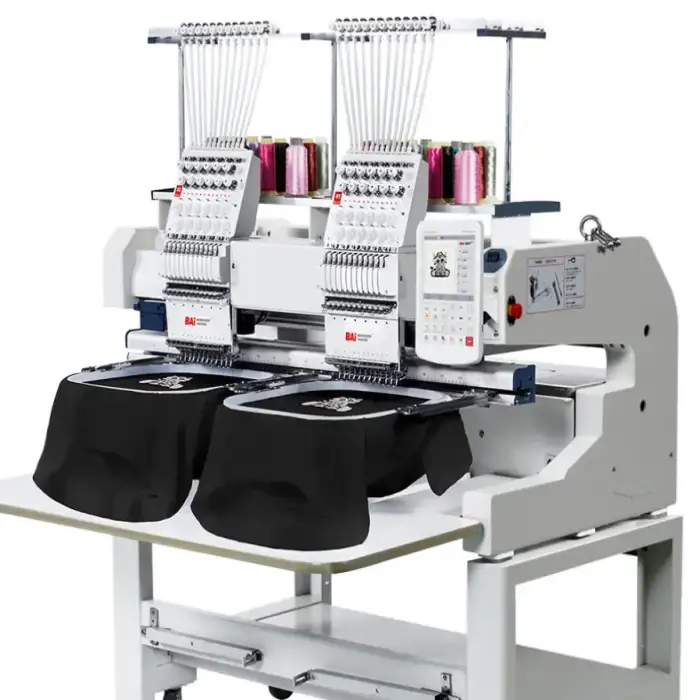
Industrial 15 Needles 2 Head Embroidery Machine
Asset finance available
Do you want funding for this equipment?
Afrimart can connect you with trusted funding partners who specialise in asset finance for businesses like yours. Compare options and apply in minutes — final approval is subject to provider review.
Check funding options
Secure & no obligation

- Section : Machinery
- Category : Embroidery Machines
- SKU : 60782393431

Technical Specs:
Heads - 2
Needles - 15
Maximum embroidery Area - 400*500mm
Maximum speed - 1200 spm
Memory - 20 million stitches or 200 designs
Connection - USB/WIF
Voltage - AC110V-230V 50/60 HZ
Computer - 10" user-friendly touch screen
- Shipping Timeframes: All orders are processed within 2-5 business days (excluding weekends and holidays). After your order has been processed, the estimated delivery time is before 04 Aug, 2026, depending on customs, Please note that due to high demand, some items may experience longer shipping times, which will be communicated at order confirmation email.
- Order Processing Time: Please allow 2-5 business days for us to process your order before it is shipped . Orders placed after 16:00 on Fridays, or during weekends and public holidays, will begin processing on the next business day. Processing times may be extended during peak seasons or sales events.
- Manufacturing Time: Some products needs manufacturing time, the manufacturing process will take approximately 10-30 business days depending on the product. This timeframe may vary depending on the complexity of the product and current demand. but this will be communicated with you during order confirmation.
- Returns and Exchanges: We offer a 30-day return policy for most items. If you are not completely satisfied with your purchase, you may return it within 30 days of receipt for a refund or exchange. Items must be unused, in their original packaging, and accompanied by proof of purchase. Return shipping costs are the responsibility of the customer, unless the item was damaged or defective upon arrival.
1. What are the main specifications of the Industrial 15 Needles 2 Head Embroidery Machine?
The machine has 2 heads and 15 needles per head, a maximum embroidery area of 400 × 500 mm (per head), a maximum speed of 1,200 stitches per minute, onboard memory for 20 million stitches or 200 designs, USB and Wi‑Fi connectivity, AC 110–230 V 50/60 Hz power, and a 10-inch user-friendly touch screen.
2. Is the 400 × 500 mm embroidery area per head or total?
The stated 400 × 500 mm area refers to the maximum embroidery field per head.
3. Can both heads run the same design simultaneously and stay synchronized?
Yes. The two heads are designed to run synchronized embroidery so you can produce identical items on each head at the same time, increasing throughput. Proper setup and threading are required to maintain sync.
4. How do I load designs into the machine?
Designs can be loaded via USB or over Wi‑Fi using the machine's file import functions on the 10" touch screen. Refer to the user manual for step‑by‑step import and transfer instructions.
5. How much design storage does the machine have?
The onboard memory can store up to 20 million stitches or approximately 200 designs, depending on individual design complexity and stitch count.
6. Which embroidery file formats does the machine support?
Many industrial machines support common formats such as DST, PES, EXP and others, but supported formats can vary. Check the machine's user manual or contact the supplier for the exact list of compatible file formats.
7. What voltage and power requirements are needed?
The machine accepts AC 110–230 V at 50/60 Hz. Ensure your facility wiring and plug adapters (if needed) comply with local electrical codes and the machine's requirements.
8. What types of fabrics and items can it embroider?
With the 400 × 500 mm field and 15 needles, the machine can embroider a wide range of flat items such as shirts, jackets, bags, towels, and panels. For specialized items like caps or shoes, verify hooping accessories and optional attachments are available.
9. How many colors can I use without rethreading?
The machine has 15 needles per head, so you can load up to 15 thread colors per head before needing to change threads. Planning color order and thread assignments helps minimize downtime.
10. What routine maintenance is required?
Routine maintenance includes daily cleaning of lint and dust from the bobbin area and hook, regular oiling of recommended points per the manual, checking needle condition and tension, and periodic professional servicing. Always follow the supplied maintenance schedule.
11. Can I edit designs directly on the 10" touchscreen?
The touchscreen typically allows basic functions such as scaling, rotating, mirroring, color reassignments, and sequence adjustments. For advanced editing, use dedicated embroidery software on a computer and then transfer the finished file to the machine.
12. Is Wi‑Fi file transfer secure and reliable?
Wi‑Fi allows convenient wireless file transfer; reliability depends on your local network strength and configuration. For critical production, use USB transfer as a stable alternative and secure your network per IT best practices.
13. Are replacement parts and needles readily available?
Replacement needles, bobbins, hooks, and other wear parts are commonly available through the manufacturer or authorized dealers. Keep a small stock of consumables to avoid production interruption.
14. Does the machine come with warranty and technical support?
Warranty terms and technical support vary by seller and region. Check with your supplier for warranty length, what is covered, and available support or training options.
15. What safety precautions should operators follow?
Operators should disconnect power before servicing, keep hair, jewelry and loose clothing away from moving parts, use proper lighting, follow the manual for needle changes and maintenance, and ensure the machine is grounded and installed on a stable surface.
Latest Order Arrivals
Discover our latest orders

12 Heads Embroidery Machine

Toilet Paper Machine Machine

Order Collection

Cross Border Clients

Order cros border countries Collected

Industrial Machine Cllection

Agriculture Processing Machines

Ready for collection

Water Pump Equipment

Packaging Machine and accessories

Fabrics Manufacturing Equipment

Mining Equipments

Food Processing Machine

Batch of Orders

Batch of Orders

Latest Orders Labelled

wheel alignment machines

new arrivals

Pre Orders Offloading

Latest Arrivals

Latest Arrivals

Latest Arrivals

Loading

Toilet paper making machine

Toilet paper making machine

Toilet paper Rewinding Machine

latest arrivals

offloading

order success

order collection

order offloading