B21, China Town Mall, Midrand

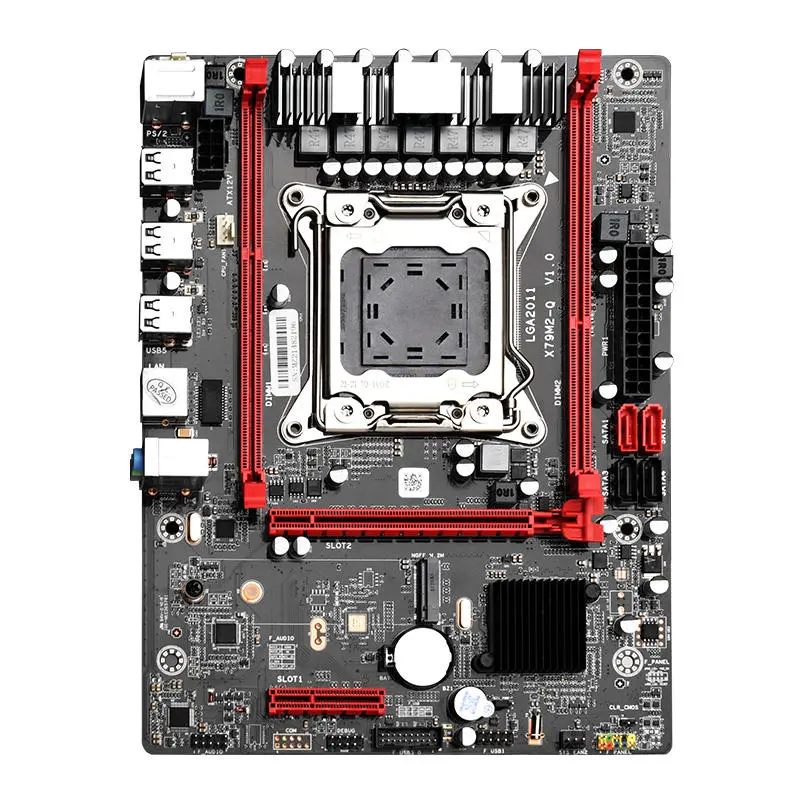
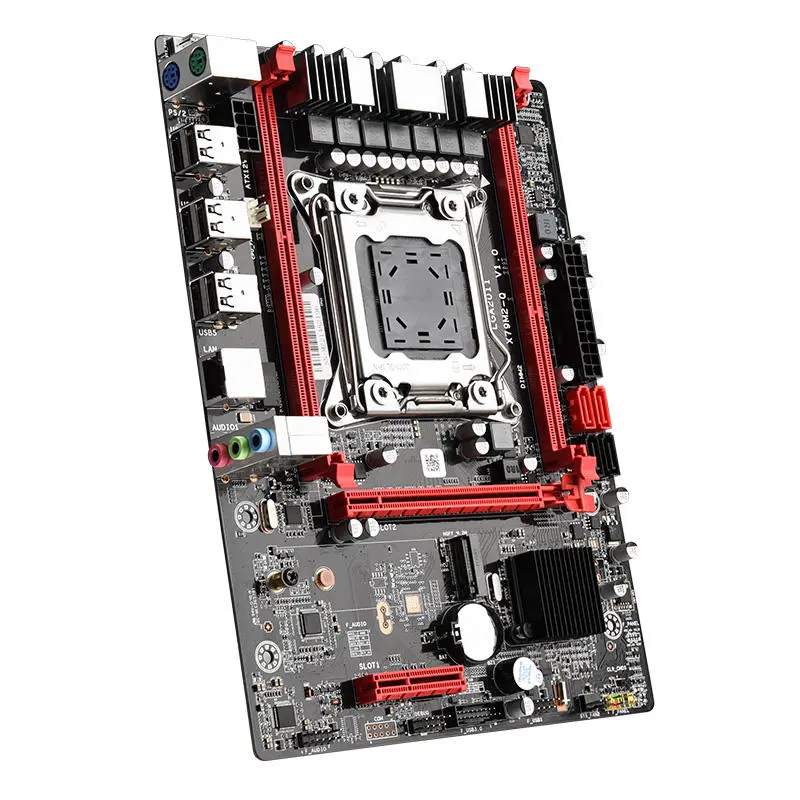
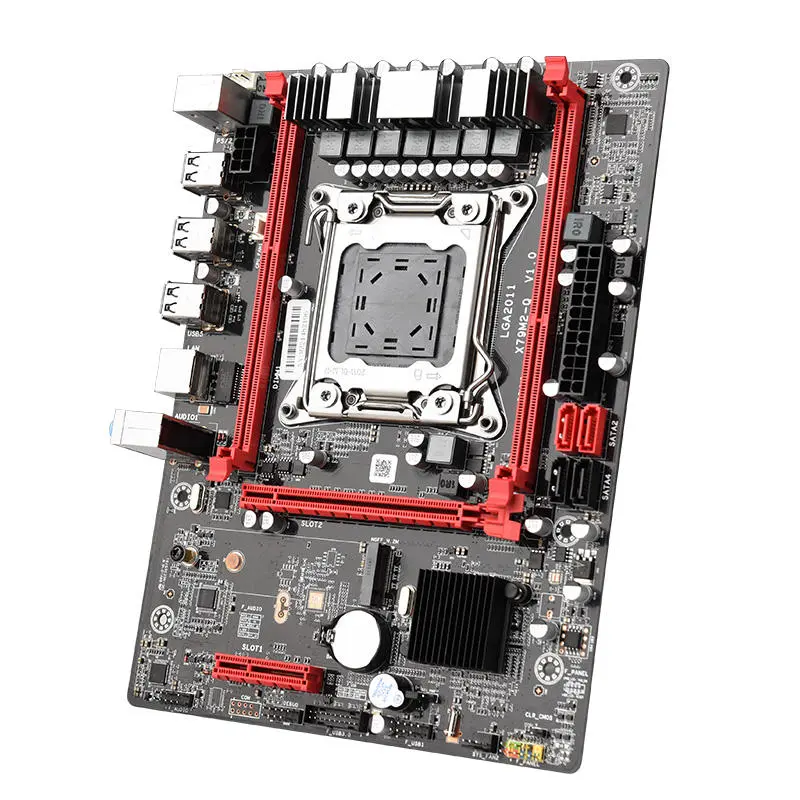


X79M2-Q Motherboard
The X79M2-Q Motherboard is a powerful, compact solution designed for high-performance desktop applications. Its advanced connectivity options, flexible expansion slots, and robust build make it ideal for gaming, multitasking, and productivity.
Key Features
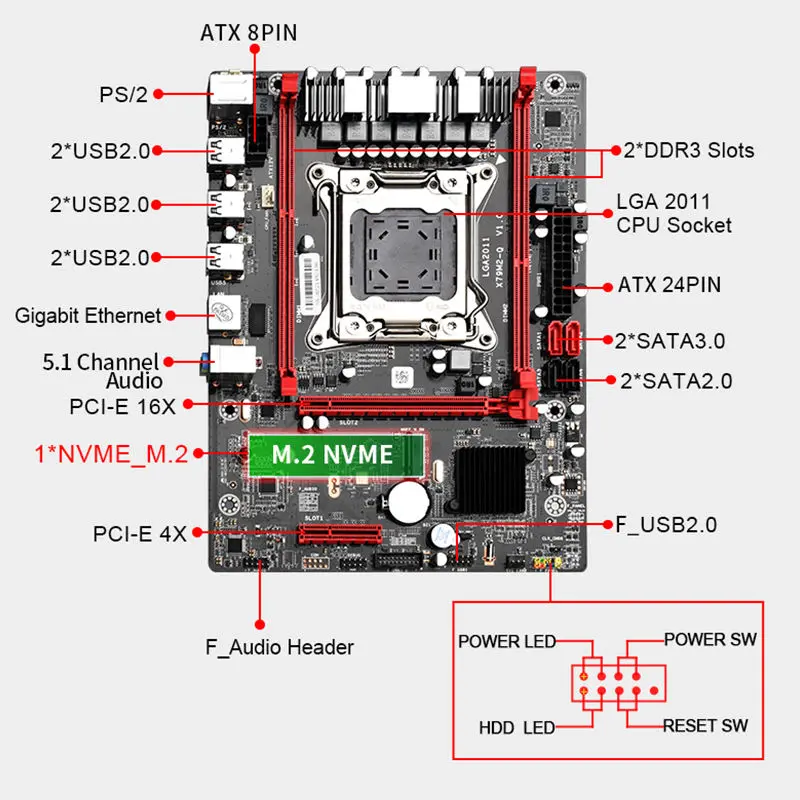
- Maximum RAM Capacity: Supports up to 64GB of DDR3 memory with dual memory channels, perfect for demanding workloads.
- CPU Compatibility: Features an LGA 2011 socket, compatible with Intel CPUs for optimal performance.
- Compact Form Factor: mATX design with dimensions of 242mm x 180mm, suitable for a wide range of PC cases.
- Flexible Expansion: Includes a PCI-E 16X graphics slot, PCI-E 4X, and an M.2 NVMe interface for high-speed storage.
- Powerful Networking: Equipped with a Gigabit Adaptive Network Card for reliable and fast Ethernet connectivity.
- Advanced Ports: Offers multiple connectivity options, including 6 USB 2.0 ports, HDMI, PS/2, SATA3.0, SATA2.0, and PCI-E X1.
- 7-Phase Power Supply: Ensures stable performance, especially during intensive tasks.
- Audio and PCB Quality: Built with ALC662 5.1 channel audio and a 4-layer PCB for durability and superior sound output.
- Operating System Support: Compatible with Windows and Linux systems, making it versatile for various setups.
The X79M2-Q Motherboard combines performance, reliability, and expansion flexibility, making it an excellent choice for both gamers and professional users.
Product Info Gallery


- Shipping Timeframes: All orders are processed within 2-5 business days (excluding weekends and holidays). After your order has been processed, the estimated delivery time is before 25 Dec, 2025, depending on customs, Please note that due to high demand, some items may experience longer shipping times, which will be communicated at order confirmation email.
- Order Processing Time: Please allow 2-5 business days for us to process your order before it is shipped . Orders placed after 16:00 on Fridays, or during weekends and public holidays, will begin processing on the next business day. Processing times may be extended during peak seasons or sales events.
- Manufacturing Time: Some products needs manufacturing time, the manufacturing process will take approximately 10-30 business days depending on the product. This timeframe may vary depending on the complexity of the product and current demand. but this will be communicated with you during order confirmation.
- Returns and Exchanges: We offer a 30-day return policy for most items. If you are not completely satisfied with your purchase, you may return it within 30 days of receipt for a refund or exchange. Items must be unused, in their original packaging, and accompanied by proof of purchase. Return shipping costs are the responsibility of the customer, unless the item was damaged or defective upon arrival.
1. What CPUs are compatible with the X79M2-Q Motherboard?
The X79M2-Q uses an LGA 2011 socket and is compatible with Intel CPUs designed for that socket. Always check the motherboard's CPU support list on the manufacturer's website and verify BIOS requirements for specific CPU models.
2. How much memory does the X79M2-Q support?
The board supports up to 64GB of DDR3 memory in dual-channel configuration. Supported speeds and configurations depend on the memory modules and the CPU memory controller.
3. What form factor is the X79M2-Q and will it fit my case?
The X79M2-Q is a microATX (mATX) board with dimensions of 242mm x 180mm. It will fit any case compatible with microATX motherboards.
4. What expansion slots are available on the X79M2-Q?
The motherboard includes a PCI‑E x16 slot for graphics cards, a PCI‑E x4 slot, and additional PCI‑E x1 expansion capability for cards like sound, network, or capture cards.
5. Does the X79M2-Q support M.2 NVMe storage and can I boot from it?
Yes, the board offers an M.2 NVMe interface for high-speed storage. Booting from an NVMe drive may require a BIOS that supports NVMe boot; check for BIOS updates and OS compatibility.
6. What SATA and USB ports does the X79M2-Q provide?
The X79M2-Q provides SATA3.0 and SATA2.0 ports for HDDs and SSDs, and multiple USB 2.0 connections (6 USB 2.0 ports). Some USB ports are on the rear I/O and additional ports may be available via internal headers.
7. What networking features are included?
The motherboard is equipped with a Gigabit Adaptive Network Card for reliable wired Ethernet connectivity suitable for gaming and productivity.
8. What audio solution does the X79M2-Q use?
It uses the ALC662 5.1-channel audio codec and a 4-layer PCB design to provide stable audio performance and improved signal quality.
9. Which operating systems are supported?
The X79M2-Q supports Windows and Linux operating systems. For best results, install the latest drivers from the manufacturer's support page for your specific OS version.
10. Is the X79M2-Q suitable for gaming and multitasking?
Yes. With an LGA 2011 CPU socket, support for up to 64GB DDR3 RAM, PCI‑E x16 graphics slot, M.2 NVMe support, and a robust power design, it is well suited for gaming, heavy multitasking, and productivity workloads.
11. Do I need a special power supply for the X79M2-Q?
No special proprietary PSU is required, but use a reliable ATX power supply with the appropriate CPU power connector and sufficient wattage for your CPU, GPU, and peripherals.
12. Can I overclock my CPU on this motherboard?
The board features a 7-phase power design that helps stability under load. While it may support moderate overclocking, it is not necessarily intended for extreme overclocking—expect limits based on VRM cooling, CPU capability, and BIOS features.
13. Where can I find drivers and BIOS updates for the X79M2-Q?
Download the latest drivers and BIOS updates from the manufacturer's official support page for the X79M2-Q. Keeping BIOS and drivers up to date improves compatibility and performance.
14. How do I install memory for optimal performance?
Install DDR3 memory in matched pairs and follow the motherboard manual's recommended DIMM population order to enable dual-channel mode, which provides the best memory performance.
Latest Order Arrivals
Discover our latest orders

12 Heads Embroidery Machine

Dewatering Pump Machine

Order Collection

Portable Water Drilling Rig

Order Usefully Collected

Batch of Orders

Agriculture Processing Machines

Meat Grinder Machine

Water Pump Equipment

Packaging Machine and accessories

Fabrics Manufacturing Equipment

Mining Equipments

Food Processing Machine

Batch of Orders

Batch of Orders

Latest Orders Labelled

wheel alignment machines

new arrivals

Pre Orders Offloading

Latest Arrivals

Latest Arrivals