B21, China Town Mall, Midrand


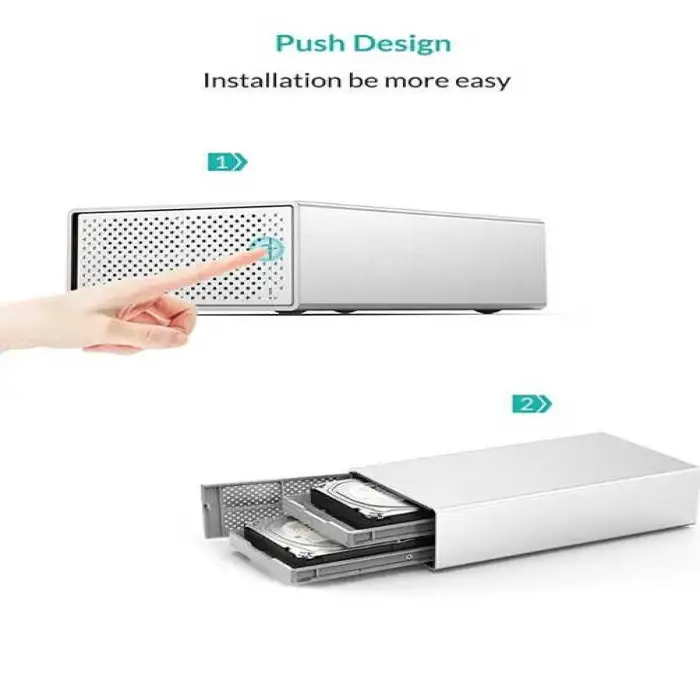
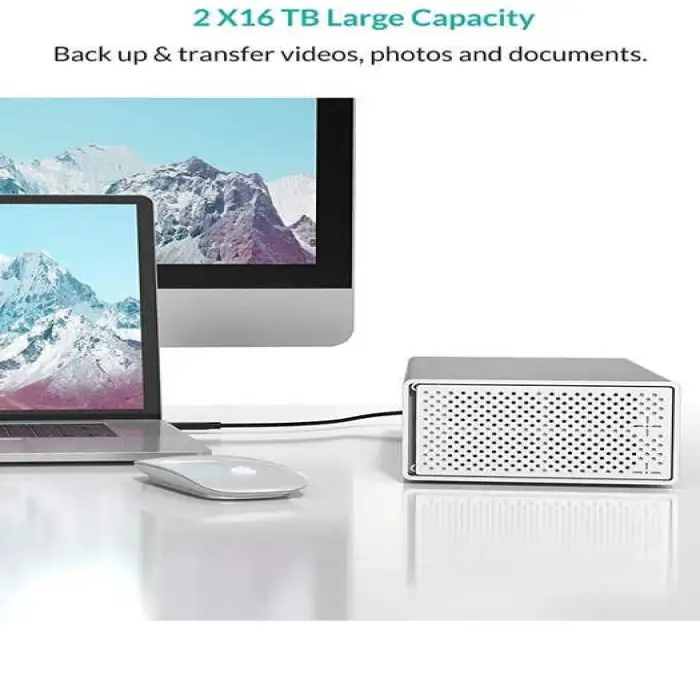
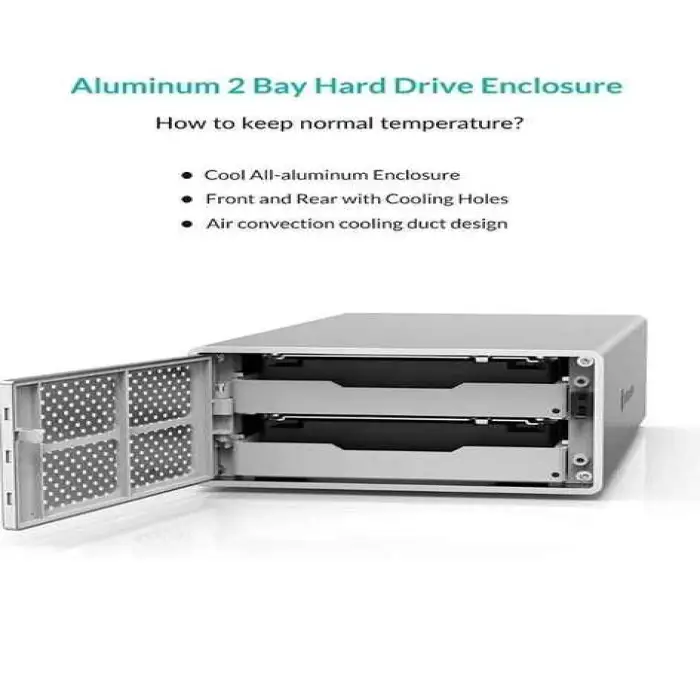

Dual-Bay 3.5-inch Disk Array Storage System Hard Disk Cabinet

- Section : Computers
- Category : HDD Boxes
- SKU : 1600935019270

Dual-Bay 3.5-inch Disk Array Storage System Hard Disk Cabinet
The New Series Dual-Bay 3.5-inch Disk Array Storage System Hard Disk Cabinet is the perfect solution for your data storage needs. This durable and stylish cabinet supports SATA hard drives and connects easily via USB 3.0. With its aluminum alloy shell, it provides excellent protection for your hard drives while ensuring efficient heat dissipation. Store, access, and protect your valuable data with confidence!
Specifications
| Attribute | Details |
|---|---|
| Size | 3.5" |
| Material | Aluminum Alloy |
| Internal Interface | SATA |
| External Interface | USB 3.0 |
| Model Number | PS200 |
| HDD Support | SATA 3.5" |
| Output | 12V 3A |
| Compatibility | WIN7/WIN8/WIN10/iOS/Other Devices |
| Weight | 0.200 kg |
Key Features
- Supports dual-bay for two 3.5-inch SATA hard drives.
- Fast data transfer with USB 3.0 interface.
- Sturdy aluminum alloy shell for durability.
- Efficient heat dissipation design.
- Compact size, easy to store and transport.
- Customizable logo options available.
Applications
- Ideal for data backup and storage.
- Perfect for expanding storage for PCs and laptops.
- Useful for media professionals needing extra storage.
- Great for storing large files like videos and images.
- Convenient for data transfer between devices.
Product Info Gallery
- Shipping Timeframes: All orders are processed within 2-5 business days (excluding weekends and holidays). After your order has been processed, the estimated delivery time is before 25 Dec, 2025, depending on customs, Please note that due to high demand, some items may experience longer shipping times, which will be communicated at order confirmation email.
- Order Processing Time: Please allow 2-5 business days for us to process your order before it is shipped . Orders placed after 16:00 on Fridays, or during weekends and public holidays, will begin processing on the next business day. Processing times may be extended during peak seasons or sales events.
- Manufacturing Time: Some products needs manufacturing time, the manufacturing process will take approximately 10-30 business days depending on the product. This timeframe may vary depending on the complexity of the product and current demand. but this will be communicated with you during order confirmation.
- Returns and Exchanges: We offer a 30-day return policy for most items. If you are not completely satisfied with your purchase, you may return it within 30 days of receipt for a refund or exchange. Items must be unused, in their original packaging, and accompanied by proof of purchase. Return shipping costs are the responsibility of the customer, unless the item was damaged or defective upon arrival.
1. What is the maximum capacity of hard drives that can be used with the Dual-Bay 3.5-inch Disk Array Storage System?
The cabinet supports dual-bay for two 3.5-inch SATA hard drives, but the maximum capacity will depend on the individual hard drives used. Make sure to check the specifications of your SATA hard drives.
2. What type of connection does this storage system use?
The Dual-Bay 3.5-inch Disk Array Storage System connects via a USB 3.0 interface, allowing for fast data transfer rates.
3. Is this product compatible with all operating systems?
This storage system is compatible with Windows 7, Windows 8, Windows 10, iOS, and other devices. Always check your device's specifications for compatibility.
4. What material is the cabinet made of?
The cabinet is constructed from a durable aluminum alloy which provides excellent protection for your hard drives and ensures efficient heat dissipation.
5. Can I use this cabinet for data backup?
Yes, the Dual-Bay 3.5-inch Disk Array Storage System is ideal for data backup and storage needs, making it a great solution for both personal and professional use.
6. How much does the Dual-Bay Disk Array Storage System weigh?
The total weight of the cabinet is approximately 0.200 kg, making it compact and easy to store or transport.
7. Does this product come with customizable logo options?
Yes, customizable logo options are available for the Dual-Bay 3.5-inch Disk Array Storage System, making it suitable for branding purposes.
8. What are the dimensions of the cabinet?
The cabinet is designed to support 3.5-inch SATA hard drives, but specific dimensions are not provided. It is compact and should fit comfortably on most desktops.
9. Can I use this cabinet for transferring data between devices?
Absolutely! The Dual-Bay Disk Array Storage System is convenient for data transfer between devices thanks to its USB 3.0 interface.
10. How does the heat dissipation work in this cabinet?
The aluminum alloy shell of the cabinet is designed to provide efficient heat dissipation, helping to keep your hard drives cool during operation.
11. Is there a warranty for this product?
Warranty information may vary by retailer, so it is best to check with the retailer from whom you purchase the Dual-Bay 3.5-inch Disk Array Storage System.
12. What is the power output requirement for this storage system?
The Dual-Bay 3.5-inch Disk Array Storage System requires a power output of 12V 3A.
13. Can I use SSDs in this cabinet?
The cabinet is specifically designed for 3.5-inch SATA hard drives. While it may support some SSDs, it is recommended to use it with SATA hard drives for optimal performance.
14. Is this product suitable for media professionals?
Yes, this storage system is particularly useful for media professionals needing extra storage for large files like videos and images.
15. How do I set up the Dual-Bay Disk Array Storage System?
Setting up the system is simple: insert your SATA hard drives into the bays, connect the cabinet to your device via USB 3.0, and power it on. Follow any additional instructions provided in the user manual.
Latest Order Arrivals
Discover our latest orders

12 Heads Embroidery Machine

Dewatering Pump Machine

Order Collection

Portable Water Drilling Rig

Order Usefully Collected

Batch of Orders

Agriculture Processing Machines

Meat Grinder Machine

Water Pump Equipment

Packaging Machine and accessories

Fabrics Manufacturing Equipment

Mining Equipments

Food Processing Machine

Batch of Orders

Batch of Orders

Latest Orders Labelled

wheel alignment machines

new arrivals

Pre Orders Offloading

Latest Arrivals

Latest Arrivals