B21, China Town Mall, Midrand

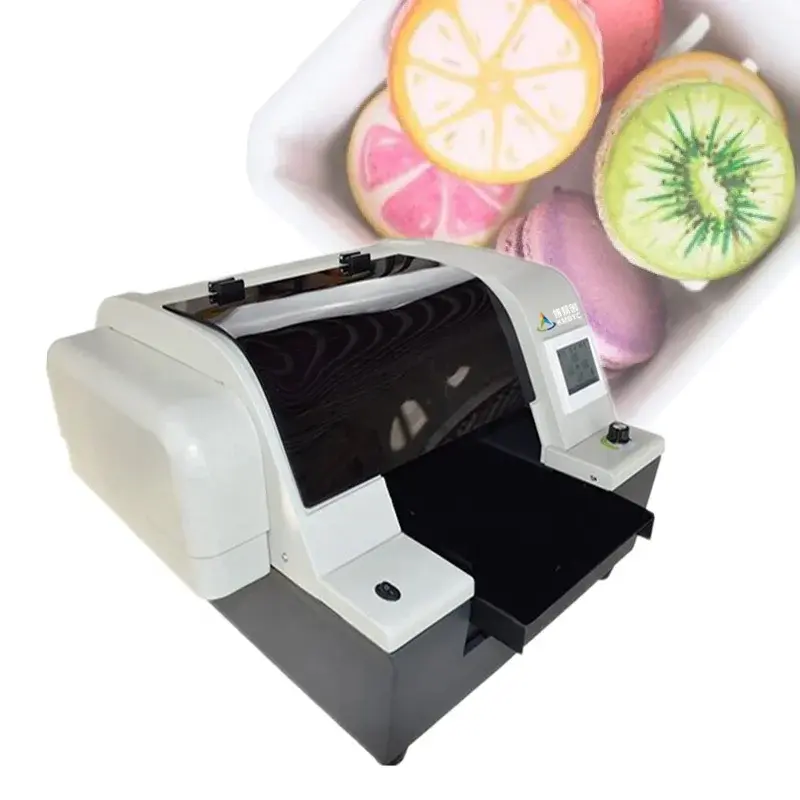
BYC168-A4 Food Printer with 500ML Food Ink and Rip Software
Asset finance available
Do you want funding for this equipment?
Afrimart can connect you with trusted funding partners who specialise in asset finance for businesses like yours. Compare options and apply in minutes — final approval is subject to provider review.
Check funding options
Secure & no obligation

- Section : Consumer Electronics
- Category : Food Printers
- SKU : 1600124920266

Product Description
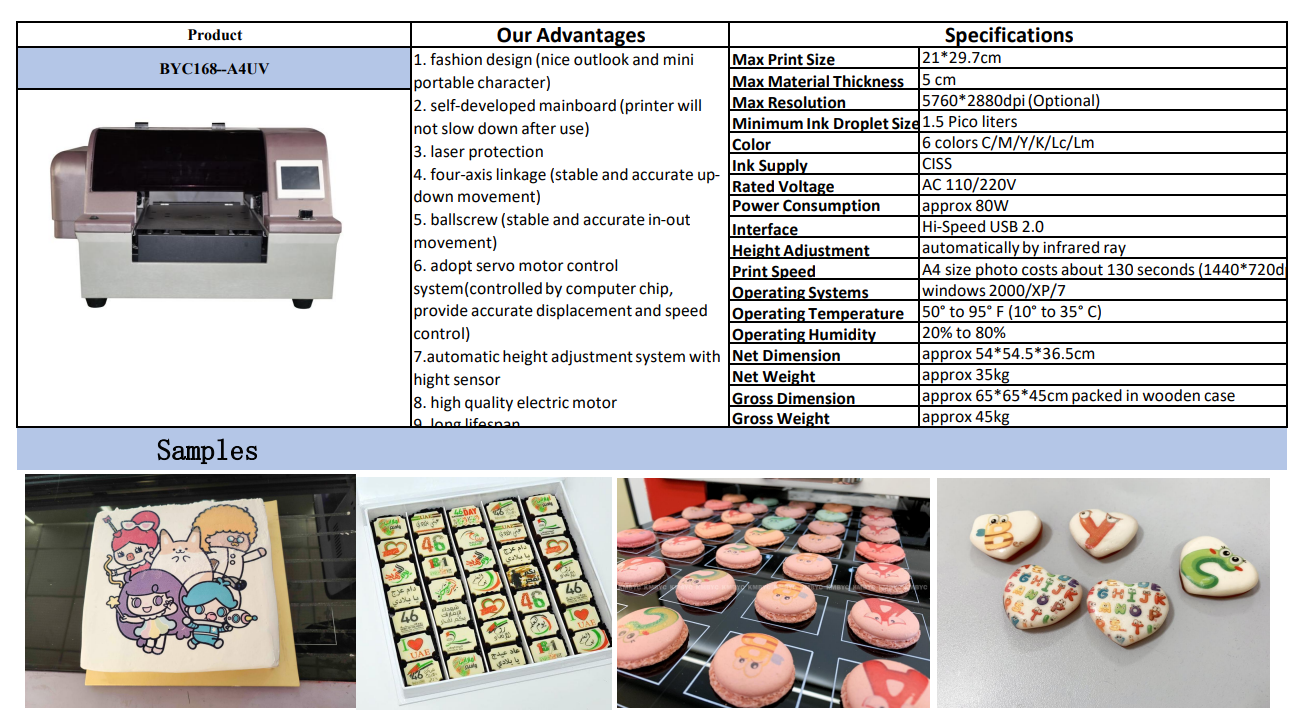
- Shipping Timeframes: All orders are processed within 2-5 business days (excluding weekends and holidays). After your order has been processed, the estimated delivery time is before 03 Aug, 2026, depending on customs, Please note that due to high demand, some items may experience longer shipping times, which will be communicated at order confirmation email.
- Order Processing Time: Please allow 2-5 business days for us to process your order before it is shipped . Orders placed after 16:00 on Fridays, or during weekends and public holidays, will begin processing on the next business day. Processing times may be extended during peak seasons or sales events.
- Manufacturing Time: Some products needs manufacturing time, the manufacturing process will take approximately 10-30 business days depending on the product. This timeframe may vary depending on the complexity of the product and current demand. but this will be communicated with you during order confirmation.
- Returns and Exchanges: We offer a 30-day return policy for most items. If you are not completely satisfied with your purchase, you may return it within 30 days of receipt for a refund or exchange. Items must be unused, in their original packaging, and accompanied by proof of purchase. Return shipping costs are the responsibility of the customer, unless the item was damaged or defective upon arrival.
1. What comes in the box with the BYC168-A4 Food Printer?
The package typically includes the BYC168-A4 printer, a set of starter components (power cable, USB cable or connection cable as specified), one 500ml set of food-grade edible ink, RIP software, a user manual, and basic maintenance tools. Exact contents may vary by seller, so check the product listing for a detailed inventory.
2. Is the included 500ML food ink edible and safe for use on food?
Yes — the supplied 500ml ink is formulated as edible food ink for printing on edible media. Verify the ink bottle labeling for specific food-safety certifications (for example FDA or EU approvals) and ingredient/allergen information provided by the supplier before use.
3. What edible materials can the BYC168-A4 print on?
It supports common edible media such as frosting/icing sheets, fondant sheets, wafer paper, rice paper, and compatible chocolate transfer sheets. For best results use flat, dry surfaces designed for edible printing; direct printing onto unprepared cake surfaces is not recommended.
4. What is the maximum print size?
The model prints up to A4 size (210 x 297 mm). Actual printable area may be slightly smaller due to mechanical margins, so check the printer settings or documentation for the exact maximum printable dimensions.
5. What file formats and color controls are supported by the included RIP software?
The included RIP software supports standard image formats such as JPEG, PNG, TIFF and PDF and provides color management, layout, scaling, cropping, and halftone options. For a precise list of supported file types and advanced features, review the software's documentation or system requirements.
6. Which computers and operating systems are compatible with the RIP software?
The RIP software is typically designed for Windows (and some versions may support macOS). Compatibility can vary by release, so check the software's system requirements on the product page or in the manual before installation.
7. How do I set up the printer for the first print?
Basic setup steps: unpack and place the printer on a level surface, connect power and data cable, install drivers and the RIP software on your computer, load and prime the edible ink according to instructions, perform a nozzle check and printhead alignment, and run a test print on an edible sheet.
8. How do I maintain and clean the printer?
Perform regular nozzle checks and automatic cleaning cycles, keep the printhead and capping station free of dried ink, use recommended food-safe cleaning solutions for deep cleaning, and follow the maintenance schedule in the manual. When not in use, store printheads and ink in accordance with supplier recommendations to prevent clogging.
9. How should the edible ink be stored and what is its shelf life?
Store unopened ink in a cool, dark place away from direct sunlight as directed on the label. After opening, follow the manufacturer's storage and use instructions. Shelf life and after-opening use window vary by formulation, so refer to the ink bottle or supplier data sheet for exact guidance.
10. Can the printer reproduce photographs and detailed full-color images?
Yes — when used with high-resolution images and proper RIP color management, the BYC168-A4 can produce detailed, full-color edible photographs suitable for cakes and other confections. Image quality depends on resolution, substrate, and color calibration.
11. What should I do if prints are streaky, washed out, or missing colors?
Run the printer's nozzle check and automatic cleaning cycle first. Ensure ink cartridges are properly installed and not empty, perform printhead alignment, and verify color profiles in the RIP software. If problems persist, perform a manual head clean/flush per the manual or contact vendor support.
12. Can I switch ink brands or colors easily, and how to avoid cross-contamination/allergen issues?
Switching inks or brands may require thorough flushing and cleaning of the ink lines and printhead to avoid color contamination. If allergens are a concern, dedicate a printer or thoroughly clean all components between uses and verify ingredient declarations from ink suppliers.
13. Are replacement inks, printheads and spare parts available?
Replacement edible inks, cartridges, and common service parts are usually available through the manufacturer or authorized distributors. Availability depends on your region and supplier; confirm part numbers and compatibility before ordering.
14. What is the typical print speed and resolution?
Print speed and resolution depend on chosen quality settings, image complexity, and RIP configuration. The printer supports high-quality output suitable for photographic edible prints; lower-resolution/draft modes will print faster. Refer to the product manual or supplier for typical throughput estimates.
15. What warranty and technical support are offered for the BYC168-A4?
Warranty terms and support services vary by seller and region. Check the product listing or contact the vendor for warranty duration, what is covered, and how to obtain technical support, driver updates and replacement parts.
Latest Order Arrivals
Discover our latest orders

12 Heads Embroidery Machine

Toilet Paper Machine Machine

Order Collection

Cross Border Clients

Order cros border countries Collected

Industrial Machine Cllection

Agriculture Processing Machines

Ready for collection

Water Pump Equipment

Packaging Machine and accessories

Fabrics Manufacturing Equipment

Mining Equipments

Food Processing Machine

Batch of Orders

Batch of Orders

Latest Orders Labelled

wheel alignment machines

new arrivals

Pre Orders Offloading

Latest Arrivals

Latest Arrivals

Latest Arrivals

Loading

Toilet paper making machine

Toilet paper making machine

Toilet paper Rewinding Machine

latest arrivals

offloading

order success

order collection

order offloading